General Inquiries
What is a Unified Trading Account (UTA)?
The Bybit Indonesia Unified Trading Account (UTA) is a versatile all-in-one account mode that offers traders access to multi-currency trading and core trading products for the spot market. It provides traders with a powerful option to combine trading and investment without switching between accounts.
What are the benefits of UTA?
Aside from the operational convenience of combining all trading instruments into a single account, UTA offers users several key trading benefits. For more information, please refer to the 8 Key Benefits of Upgrading to Bybit’s Unified Trading Account.
How are my assets organized in a Unified Trading Account?
Below is the account structure under UTA:
-
Funding Account: You can make deposits or withdrawals via a Funding Account.
-
Unified Trading Account: To trade Spot or allocate assets to your staking plans on Bybit Indonesia Earn.
What is the transferable amount?
The transferable amount on your UTA asset page is the maximum amount of the respective coin that you can transfer out from UTA for withdrawal. This is an estimated amount after considering the unrealized loss, initial margin, frozen amount for active orders, haircut loss, order loss, or any negative option value.
The actual amount that can be transferred is subject to the real-time display in the Transfer window. You will not be able to transfer out more funds from UTA when the such funds are currently being used to place an active order.
Trading Related
Why am I unable to place an order?
There are two plausible reasons why you are unable to place an order.
-
Failure to meet the minimum required amount for order placement
The order value or amount you place might be too low, or you don’t have enough available balance to meet the minimum requirement for a specific trading pair’s order placement. Please always make sure that you have enough available funds in your account prior to placing an order, or trade/convert your available asset to your desired asset.
-
Maximum order amount has been exceeded
If you have enough available funds but are still unable to place an order, it is possible that the order amount/value you input exceeds the maximum limit for your chosen trading pair in a single order.
To circumvent this, you may need to place multiple orders to meet your desired amount or exchange your assets via OTC trading instead. Please note, however, that placing multiple orders will incur separate trading fees in proportion to the number of trades.
Read more
How to Transfer Assets on Bybit Indonesia
FAQ — Bybit Indonesia OTC Trading
How to Get Started with Spot Trading
Can I place an order even if the available balance is insufficient in UTA?
Unfortunately, no. If you have an insufficient balance in your UTA, you must transfer available assets from your funding account or make a deposit beforehand.
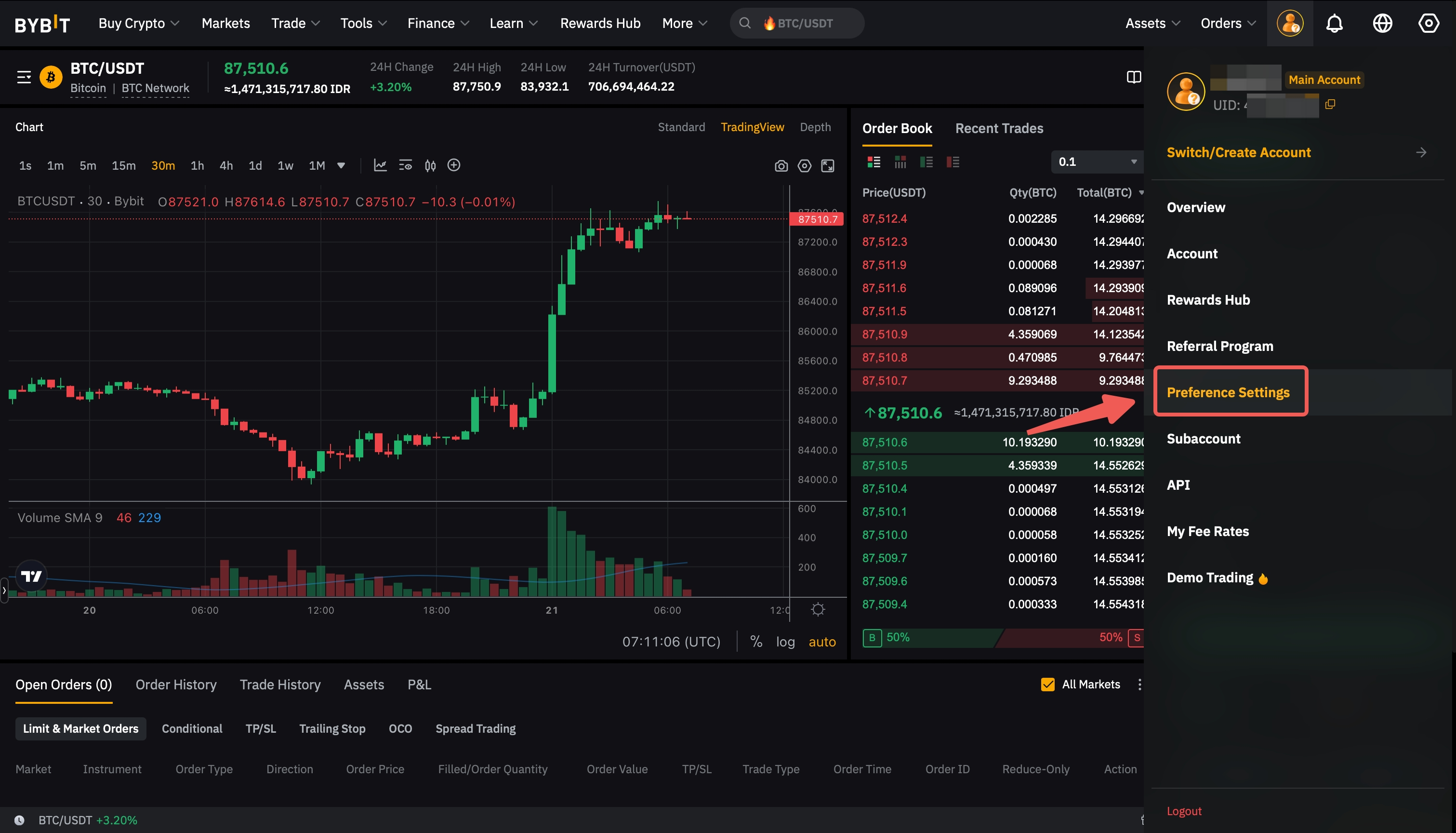
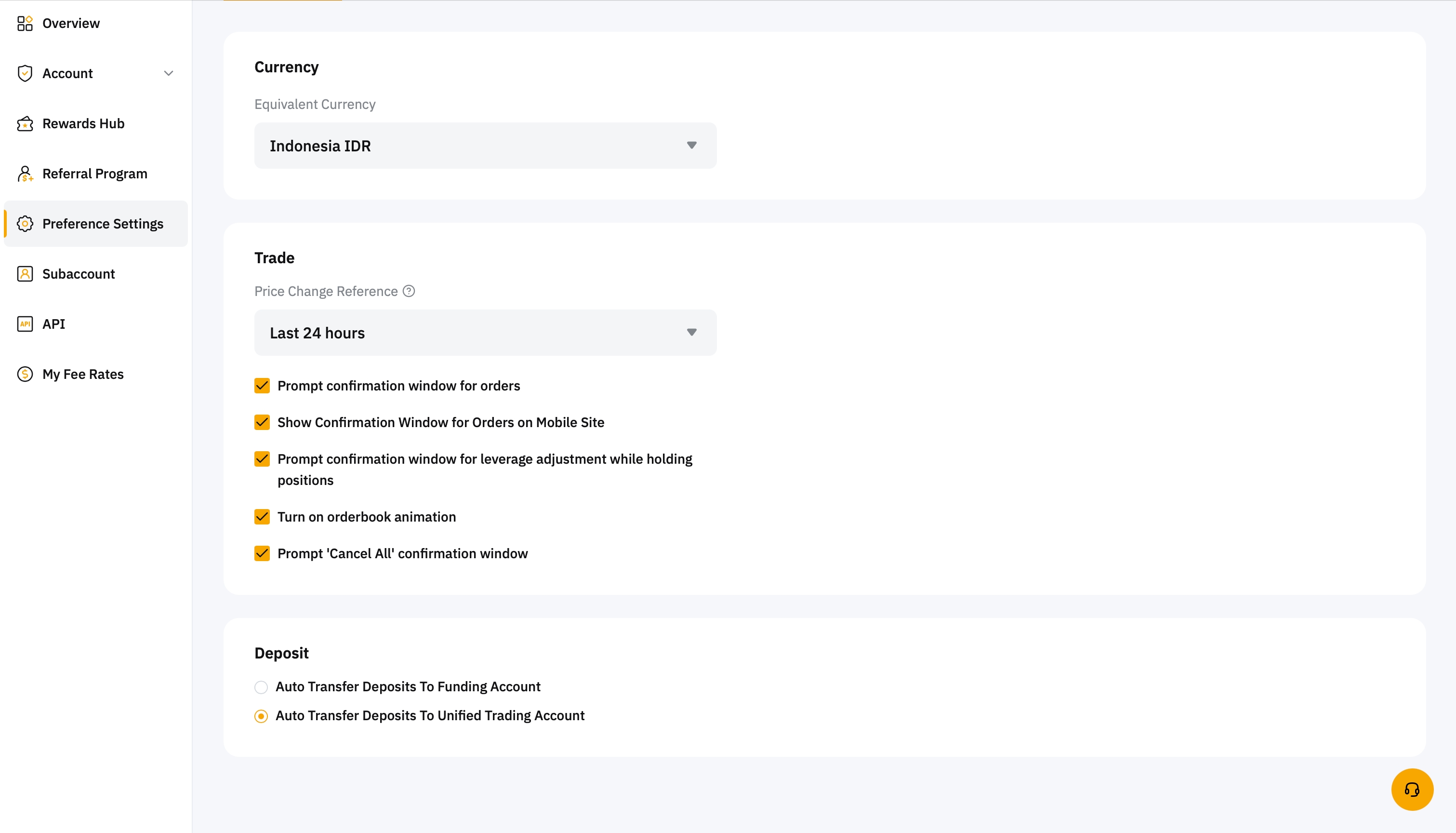
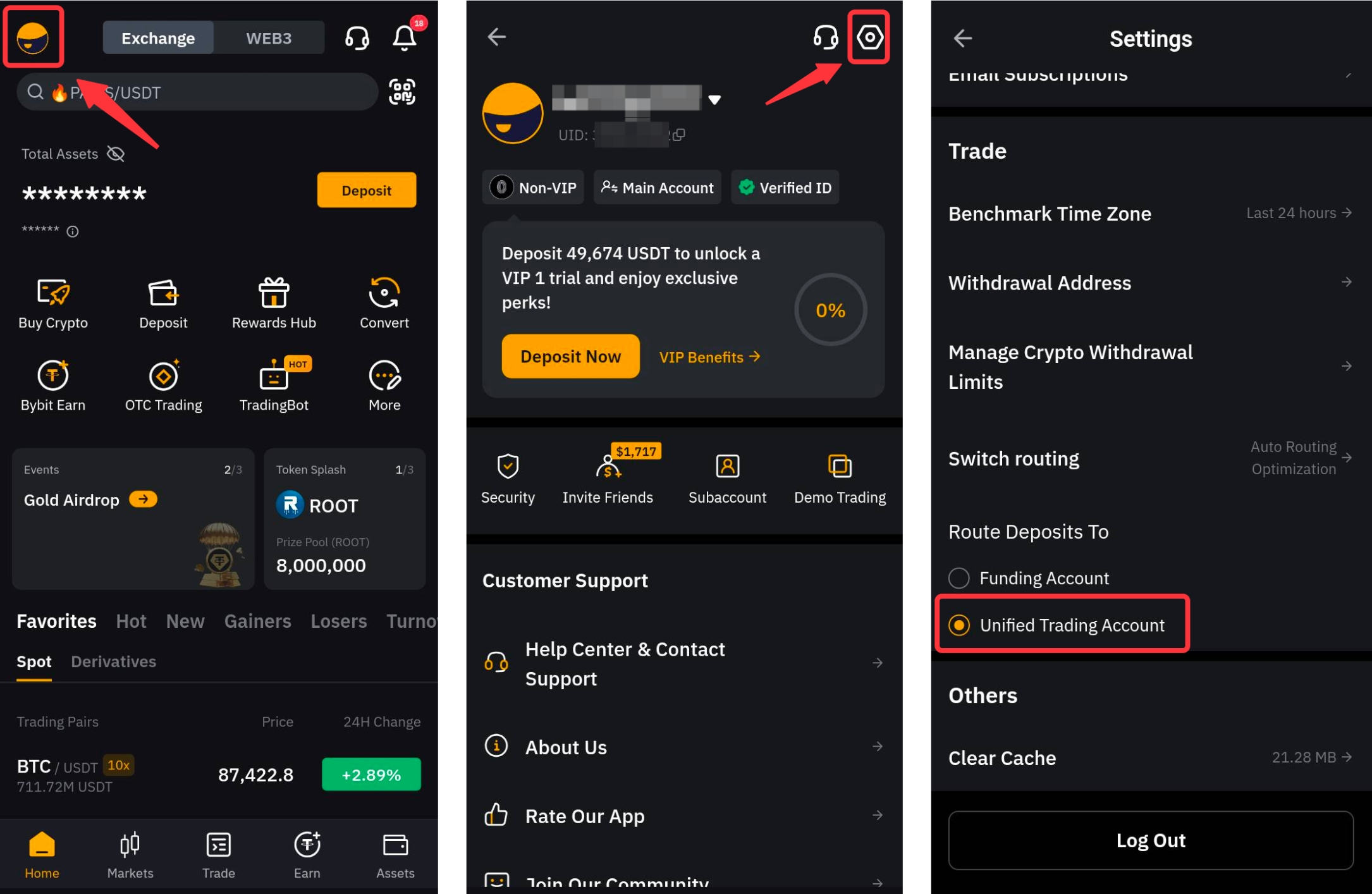
To streamline your trading, you can reroute your deposit destination to UTA instead of your Funding Account. Follow the steps below to activate this option.
On any Bybit Indonesia page, hover your cursor over the Profile icon, then click on Preference Settings in the dropdown menu.
Then, scroll down to the Deposit section, and toggle the Auto Transfer Deposits to Unified Trading Account. This way, your deposited assets will be allocated automatically to your UTA.
On the homepage of Bybit Indonesia app, go to Profile → Settings to open the preference settings page. Then, scroll down to the Route Deposits To section, and switch to the Unified Trading Account.
Are my bonuses/fee savers affected after I upgrade to a Unified Trading Account?
No, after you upgraded your account to a Unified Trading Account, you can use the bonuses/fee savers you received. However, you will not be able to claim your bonus/fee savers from the Rewards Hub until the upgrade process is complete. You will also be unable to claim your rewards if you have a negative wallet balance in UTA.
Please note that in the event of receiving both bonus and fee savers at the same time, the bonus will be used before the fee saver.
Where can I view the order limits for my preferred trading pairs?
You can view the order limits for spot trading here, which comprises the minimum and maximum order value and quantity for each listed trading pair as well as their price limits.