
How to close a trade on Bybit Indonesia
AI Summary
Show More
Quickly grasp the article's content and gauge market sentiment in just 30 seconds!
Closing a trade is the final step in your trading journey on Bybit Indonesia. It allows you to realize profits or limit potential losses in the market. This guide explains several ways to close trade on Bybit Indonesia effectively.
You will learn manual closing methods and automated tools like stop loss. Mastering the Bybit Indonesia close position process ensures you protect your capital during volatility. Understanding these options helps you exit the market with precision and confidence.
Key takeaways
Closing a trade helps you secure profits and manage risk effectively.
Bybit Indonesia offers manual and automated tools to help you exit your positions.
Using take profit and stop loss orders automates the Bybit Indonesia close position process.
Closing a trade by placing an opposite order
Placing an opposite order is a simple way to exit your current trade. This method cancels out your position using a standard market or limit order.
To close trade on Bybit Indonesia, you buy an asset if you currently hold a short position. You must sell the asset if you hold a long position to complete a Bybit Indonesia close position. This manual process gives you direct control over your exact exit timing and price. It is an essential skill for every trader looking to manage their portfolio effectively in Indonesia.
How to place an opposite order on Bybit Indonesia web
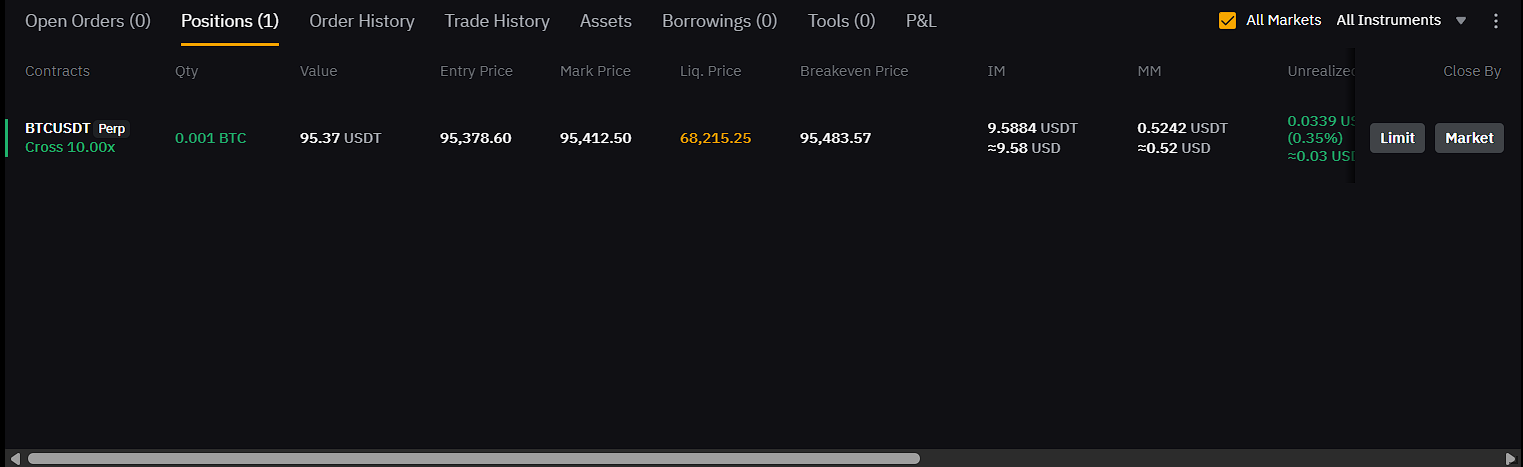
Step 1: Access the positions tab on Bybit Indonesia web
Log in to your account through a web browser to access the trading terminal. Navigate to the Trade menu and select your active trading pair.
Scroll to the bottom of the screen to find the Positions tab. This section lists every active trade currently running in your account. Locate the specific contract you wish to finalize for a Bybit Indonesia close position.
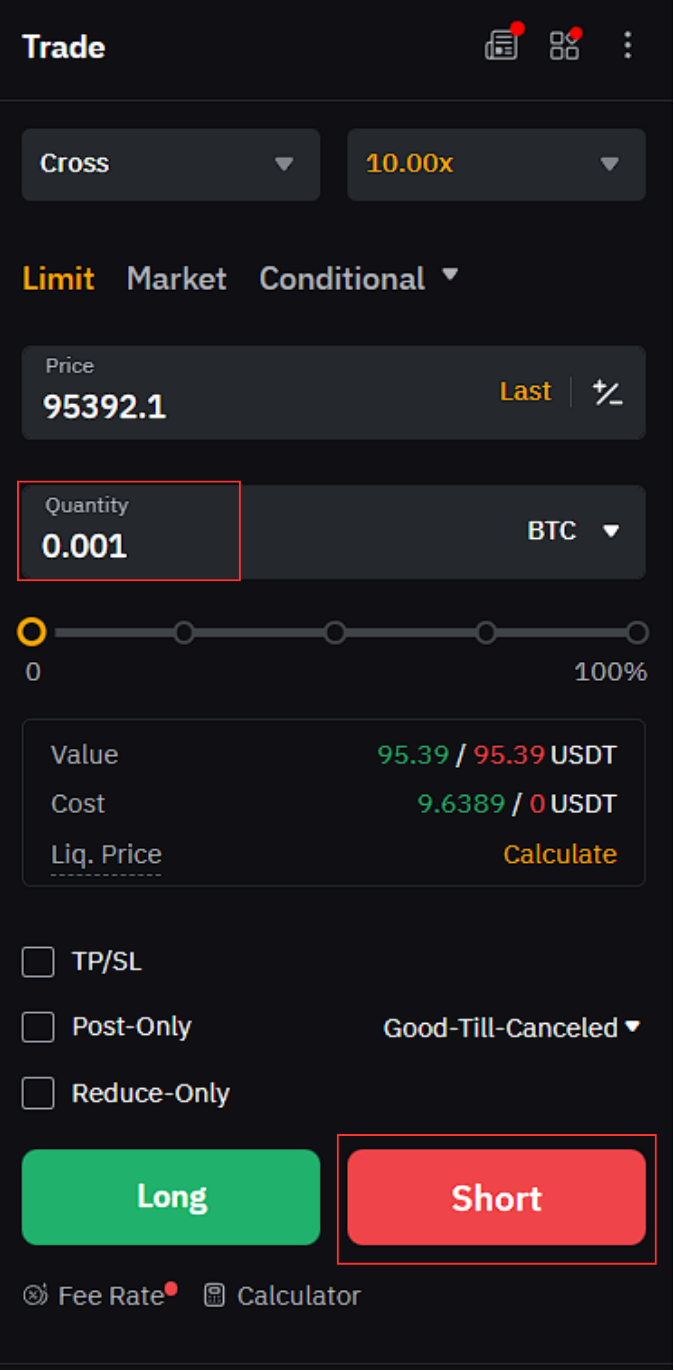
Step 2: Enter order details for the opposite trade
Check your current position size in the Positions tab at the bottom. Go to the order panel on the right side of the screen.
Enter the exact quantity of your open position in the Quantity field. Select the opposite direction to successfully close trade on Bybit Indonesia. For example, click the red Short button to exit a current Long position.
How to place an opposite order on Bybit Indonesia app
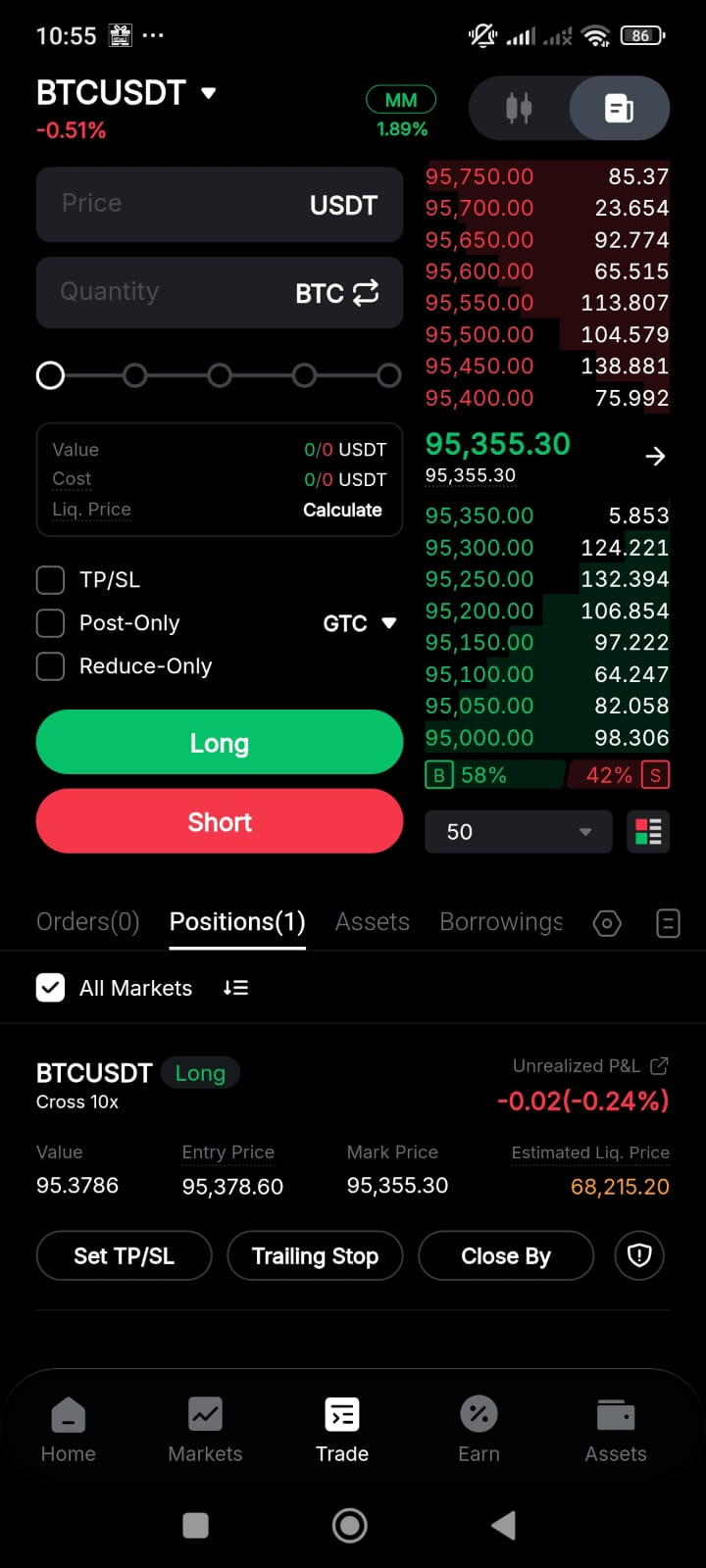
Step 1: Open the positions tab on the Bybit Indonesia app
Open the Bybit Indonesia app and tap the Trade icon in the bottom navigation bar. Look for the Positions tab in the lower half of your screen.
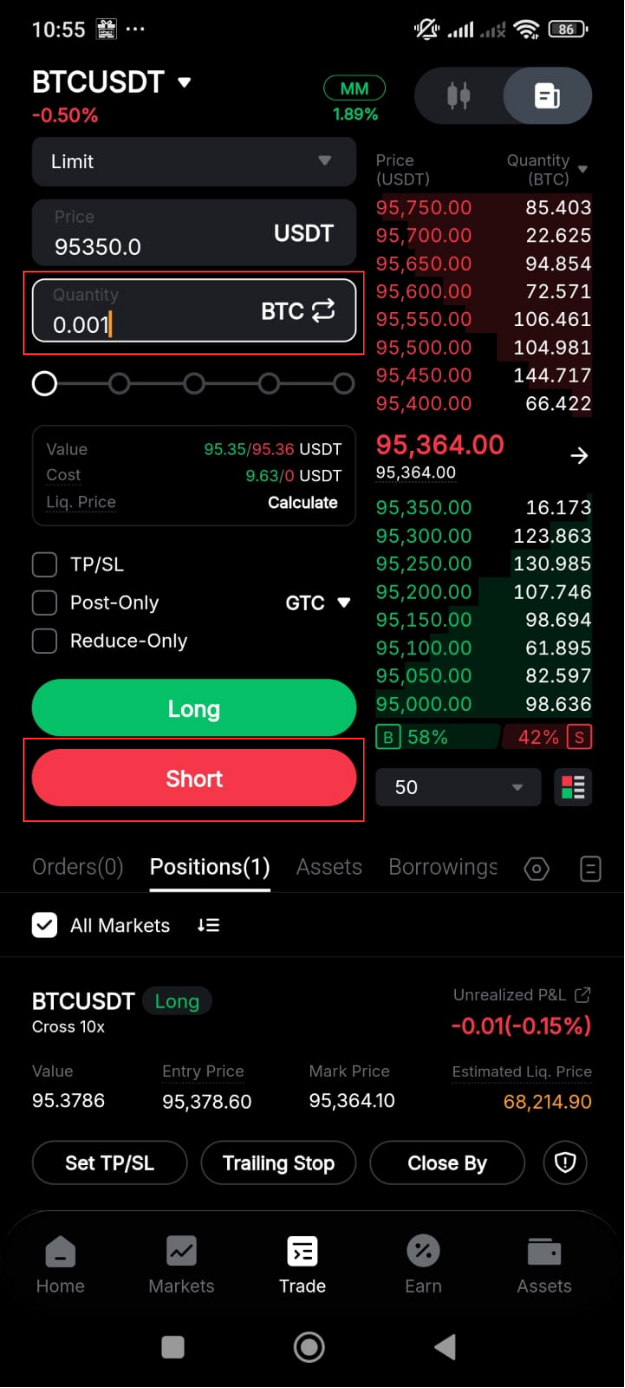
Step 2: Set the opposite order details
Enter the exact quantity of your active position in the Quantity field. Match the amount shown in your Positions tab to ensure a full exit. Tap the opposite direction button to trigger your close trade on Bybit Indonesia. For example, tap the red Short button if you currently hold a Long position. This manual method provides a fast way to achieve a Bybit Indonesia close position on mobile.
Closing a trade using take profit and stop loss (TP/SL)
Using take profit and stop loss (TP/SL) orders is a vital risk management strategy. These automated tools help you exit the market without constant monitoring.
TP/SL orders are automated tools to close your position at set prices. Take profit secures your gains when the price reaches your target. Stop loss limits your losses if the market moves against you.
How to set TP/SL when creating an order
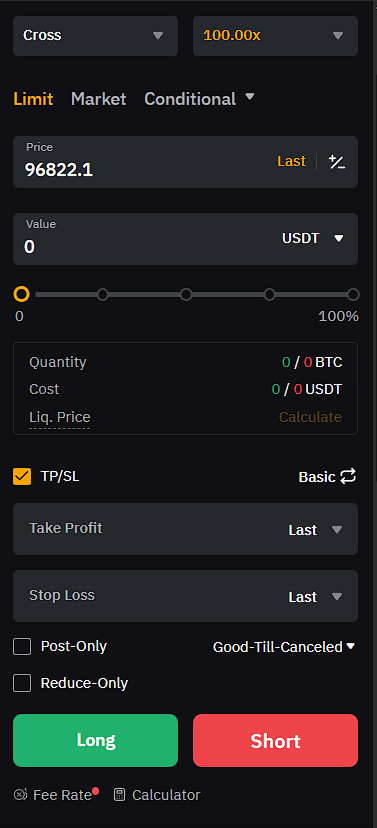
Step 1: Setting TP/SL during order placement
Tick the TP/SL box in the order panel before submitting your trade. Enter your desired exit prices in the Take Profit and Stop Loss fields.
How to add TP/SL to an open position
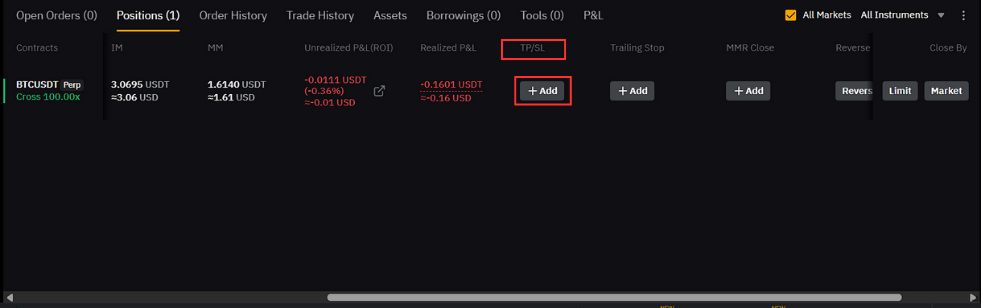
Step 1: Access the TP/SL settings for your position
Navigate to the Positions tab at the bottom of your trading screen. Look for the specific contract you wish to manage for a Bybit Indonesia position close .
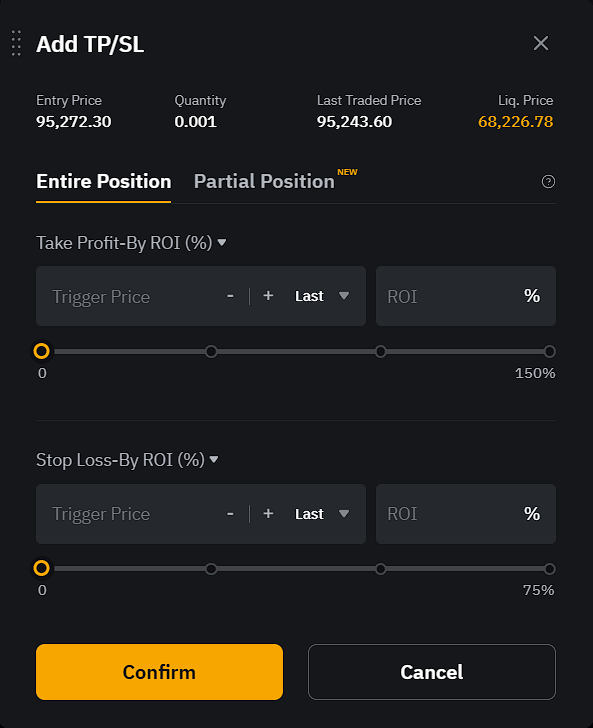
Step 2: Configure your TP/SL levels
The Add TP/SL window appears once you select your open position. Choose between the Entire Position or Partial Position tabs to define your exit strategy.
Enter your preferred Trigger Price or ROI percentage for both profit and loss targets. You can use the sliders to set these levels quickly based on your risk tolerance. This automation is a reliable way to close trade on Bybit Indonesia.
How to modify a TP/SL order
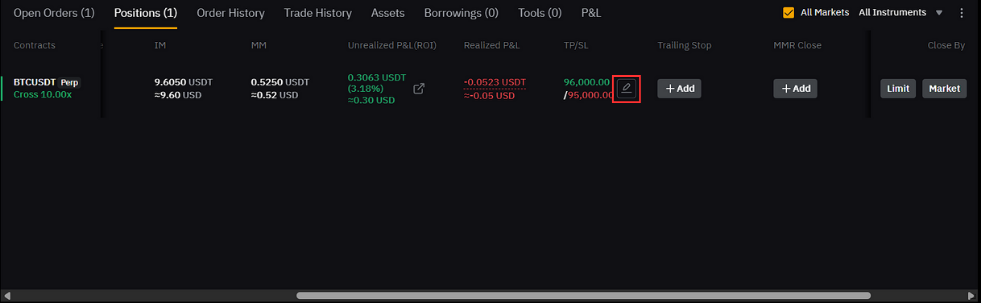
Step 1: Open the TP/SL edit window
Go to the Positions tab at the bottom of the Bybit Indonesia trading page. Locate the active trade you want to change.
Find the TP/SL column where your current price levels are visible. Click the small pencil icon next to the existing profit or loss targets. This action opens the modification window so you can adjust your TP/SL.
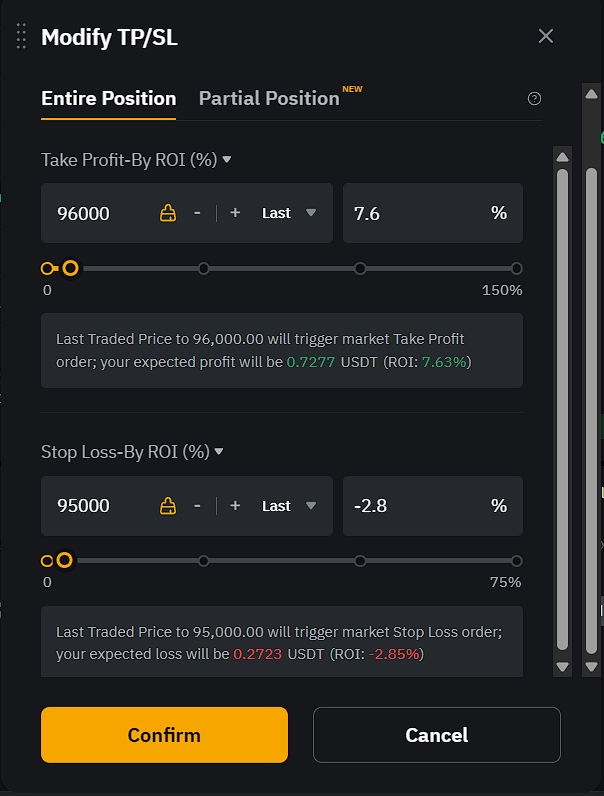
Step 2: Update your TP/SL parameters
The Modify TP/SL window lets you update your current exit prices. Adjust your trigger price or ROI percentage to refine your Bybit Indonesia close position.
You can also move the sliders to change your profit and loss targets quickly. Review the expected profit or loss summary before you save the new settings. Click the orange Confirm button to update your TP/SL order.
How to cancel a TP/SL order
Canceling a TP/SL order allows you to stop automated exit instructions. This process gives you full control to manage your trade manually again. You can remove these triggers if market conditions change unexpectedly.
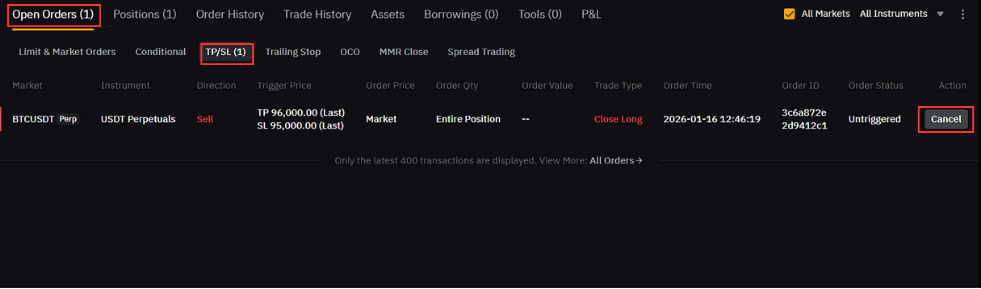
Step 1: Locate your open trigger orders
Navigate to the Open Orders tab at the bottom of the trading page. Click on the TP/SL sub-tab to see your active trigger orders.
Locate the specific contract you want to update or remove. Click the Cancel button on the right side of the order line. This action immediately stops the automated trigger for your Bybit Indonesia TP/SL order.
Alternative method to cancel your TP/SL order
You can also cancel your exit instructions directly from the positions menu. This method is faster if you already have the trading terminal open.
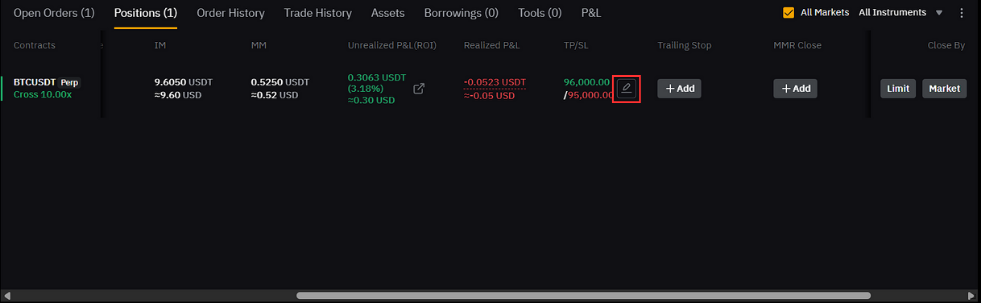
Step 1: Click the edit icon in your positions
Go to the Positions tab at the bottom of the trading page. Locate the pencil icon in the TP/SL column of your active trade. Click this icon to modify your planned TP/SL order. This action opens the settings window to modify trade on Bybit Indonesia.
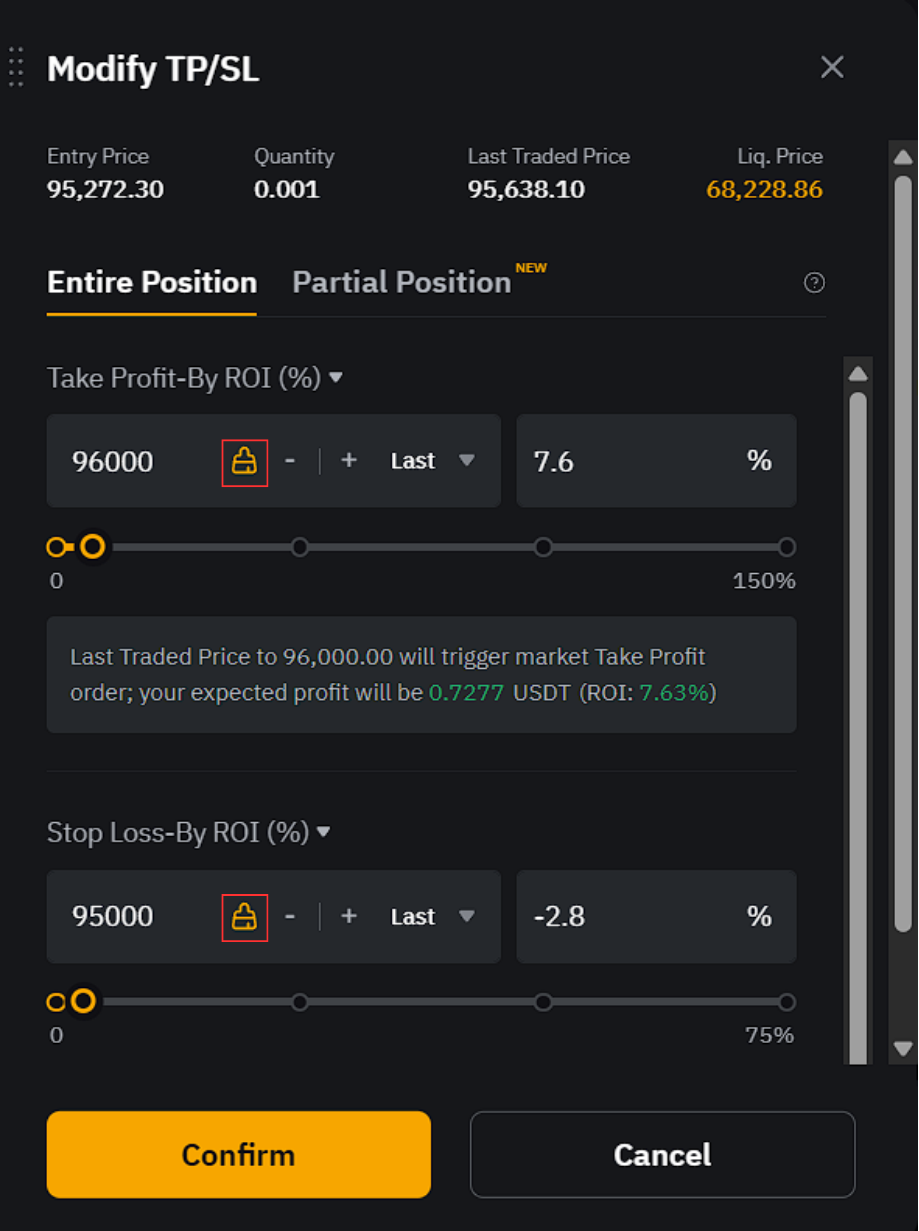
Step 2: Clear the trigger price and confirm
Click the clear icon next to the trigger price you want to remove. This icon looks like a small yellow symbol next to the price field.
Select the orange Confirm button at the bottom to finalize your request.
Manual close vs take profit and stop loss
Choosing between manual and automated exits depends on your trading style. Each method offers specific benefits for managing your risk.
Manual closing gives you full control over your exit timing. You can react to sudden market news in real time. This method requires you to stay active at your trading terminal. It is best for traders who prefer to monitor every price move.
Automated orders like TP/SL work without your constant supervision. They execute immediately when the market hits your target price. This approach helps you maintain a strict and disciplined plan. It also removes emotional decisions during periods of high volatility.
Closing thoughts
Mastering how to exit positions is vital for your trading success. You now understand how to use manual orders and automated tools. These methods allow you to close trade on Bybit Indonesia effectively.
Practice these steps to manage your trading position with ease. A clear exit plan is the best way to protect your account from volatility. Consistency and discipline will help you become a more professional trader in the long run.