The Unified Trading Account (UTA) streamlines and centralizes your access to Spot trading and asset conversion. It also serves as an alternative mode for funding besides the Funding Account, allocating assets or receiving yields from various staking products in Bybit Indonesia Earn. Thus, UTA empowers traders to trade and invest seamlessly without switching accounts.
In this article, we will guide you through the Unified Trading Account Assets page.
Key Features
-
UTA traders can transfer funds to the Unified Trading Account to perform Spot Trading.
-
Traders can deposit crypto directly into the UTA via the Deposit button.
-
UTA traders can exchange available assets for their desired tokens via Convert.
-
Traders have the option to use UTA as the funding source for staking plans in Bybit Indonesia Savings on the respective product pages.
Unified Trading Account Overview
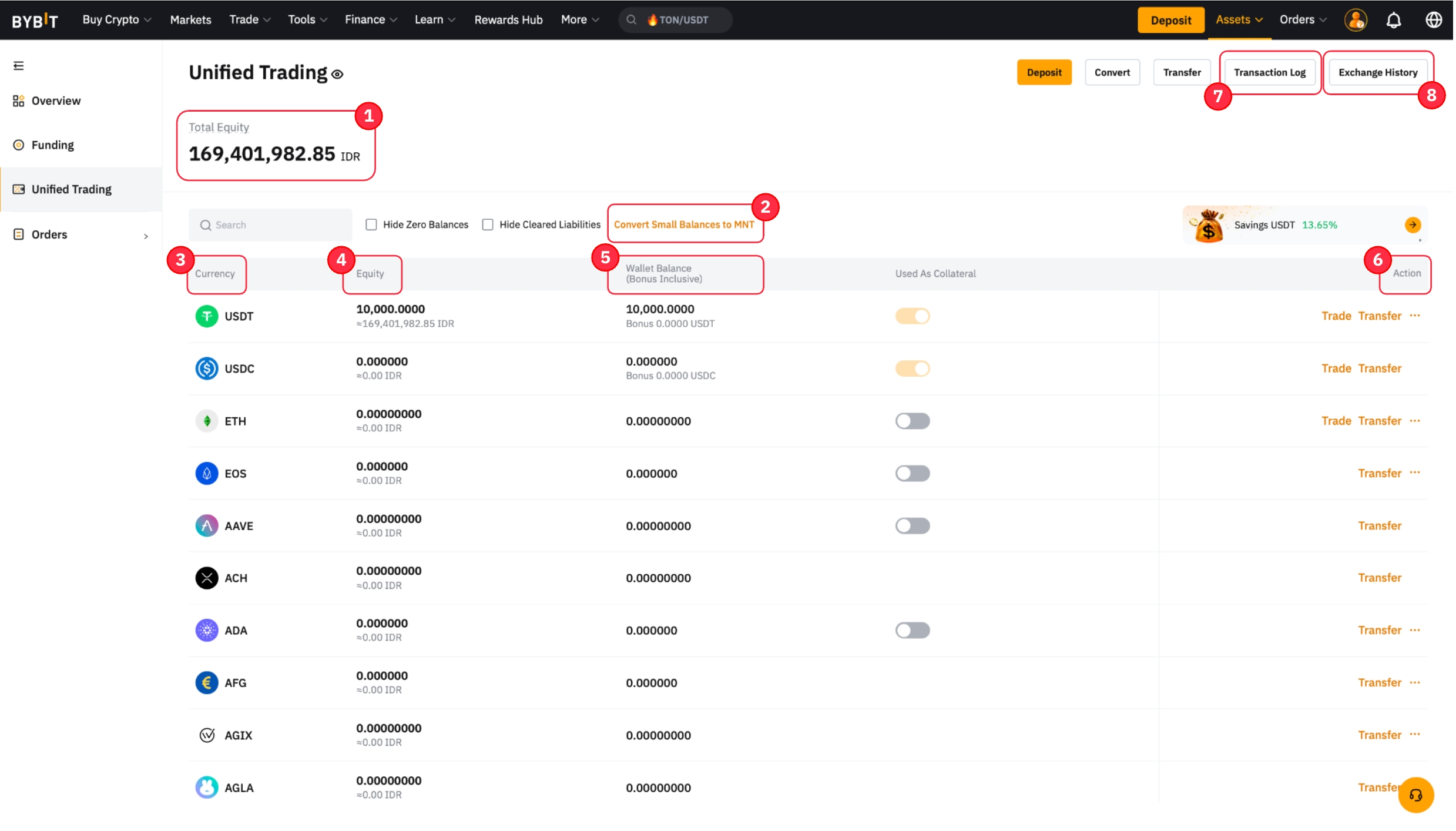
|
1 |
Total Equity |
Calculates the total asset value in your UTA account by adding the fiat currency valuation of each coin’s equity in your account. |
|
2 |
Convert Small Balance to MNT |
You can convert any assets worth 0.001 BTC into MNT. For more information, please refer to How to Convert Small Balance to MNT. |
|
3 |
Currency |
Crypto assets that are currently supported in the Unified Trading Account. |
|
4 |
Equity |
This shows the equity for the respective coin, using the same formula as total equity. |
|
5 |
Wallet Balance (Bonus Inclusive) |
The actual number of coins that you physically held in your Unified Trading Account, including any bonus. |
|
6 |
Action |
|
|
7 |
Transaction Log |
You can view the full asset change details in your Unified Trading Account from the transaction log. |
|
8 |
Exchange History |
The Exchange History displays the conversion history of your tokens. |
|
9 |
Available Balance |
This indicates the amount available for trades. However, it is not displayed on the Assets page. Traders can view it directly from the order zone of the trading page. |